
🔍 Understanding Amazon Prime and Its Refund Policy
Amazon Prime combines multiple perks — fast delivery, video streaming, music, reading, and more — under one membership. Yet not everyone uses all of these benefits, and some subscribers only discover the auto-renewal after being charged.
The good news? Amazon allows refunds in most cases, especially if you haven’t used your benefits since the last charge.

🕓 1. Amazon Prime Refund Eligibility
Amazon reviews your account activity to determine whether you’ll receive a full, partial, or no refund.
| Situation | Refund Eligibility | Description |
|---|---|---|
| Cancelled during free trial | ✅ Full refund | You’re not charged if you cancel before the trial ends. |
| Cancelled after renewal but didn’t use any benefits | ✅ Full refund | No activity means full refund automatically. |
| Cancelled after limited use | ⚠️ Partial refund | Partial refund depending on benefits used. |
| Cancelled near the end of billing period | ❌ No refund | If you used Prime most of the term, no refund applies. |
💻 2. How to Cancel Amazon Prime and Request a Refund
Canceling is simple. You can do it via the desktop website or the mobile app.
💠 Desktop Method
- Visit Amazon Your Account → Prime Membership.
- Select “Manage Membership.”
- Click “End Membership.”
- Follow the on-screen steps.
- Refund details will appear automatically if you’re eligible.
📱 Mobile Method
- Open the Amazon app → Tap ☰ Menu → Your Account → Prime Membership.
- Choose “Manage Membership.”
- Tap “Cancel Membership.”
- Confirm cancellation — Amazon processes eligible refunds automatically.
💰 3. Refund Processing Time and Methods
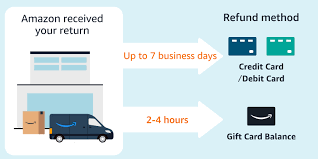
| Payment Method | Processing Time | Refund Destination |
|---|---|---|
| Credit/Debit card | 3–5 business days | Returned to the same card |
| Amazon gift balance | Within 24 hours | Added to your Amazon balance |
| Other payment methods (PayPal, etc.) | 3–10 business days | Depends on provider |
Track your refund under Your Orders → View Refund Status.
🧾 4. Amazon Prime Free Trial Refund Rules
If you’re in a 30-day free trial, you can cancel anytime before the billing date and avoid being charged.
If you cancel after being billed but have not used any benefits, you’re still entitled to a full refund.
👉 Manage or end your trial here: https://www.amazon.com/amazonprime
⚖️ 5. Full vs. Partial Refund
| Type | Conditions | Refund Example |
|---|---|---|
| Full refund | No Prime usage after billing | Charged $139, cancelled next day → $139 returned |
| Partial refund | Some benefits used | 2 shipments → approx. $20 deducted |
| No refund | Extensive usage | Used streaming + shipping → no refund |
🔄 6. Avoiding Unwanted Renewals
Prevent future auto-charges by updating your renewal settings:
- Go to Your Account → Prime Membership.
- Click “Manage Membership.”
- Select “End on Renewal Date” or “Don’t Continue.”
- Confirm.
Set an email reminder to avoid surprise renewals.
📞 7. Contacting Amazon for Refund Assistance
If you don’t see your refund within the expected timeframe, reach out directly:
- Live Chat: https://www.amazon.com/contact-us
- Phone Callback: Request via the same page.
- Email Support: Available in certain regions.
Have your order number, billing date, and account email ready for faster service.
📘 8. Key Terms in Amazon’s Refund Policy
| Term | Meaning |
|---|---|
| Unused membership | No Prime benefits used since last charge |
| Automatic renewal | Prime renews monthly / annually unless cancelled |
| Partial refund | Refund minus value of used benefits |
| Prime benefits | Shipping, streaming, reading, and other perks |
🧠 9. Common Scenarios and Likely Outcomes
| Scenario | Refund Status | Time Frame |
|---|---|---|
| Forgot to cancel free trial | ✅ Full | Instantly |
| Annual plan renewed but unused | ✅ Full | 3–5 days |
| Used 1 free shipping order | ⚠️ Partial | 5–7 days |
| Streamed Prime Video | ❌ None | — |
| Cancelled 6 months into term | ❌ None | — |
🧩 10. Checking Whether You’ve Used Prime Benefits
Before requesting a refund:
- Review Your Orders for Prime-labeled deliveries.
- Check Prime Video History for streaming activity.
- Visit Amazon Music / Prime Reading for digital content.
If none show usage, you’re likely entitled to a full refund.
🌍 11. Regional Refund Variations
| Region | Standard Policy | Reference Link |
|---|---|---|
| United States | Usage-based refund | Amazon Help U.S. |
| United Kingdom | Same as U.S. | Amazon Help U.K. |
| Canada | Same global policy | Refund in CAD |
| India | Prorated refunds per law | — |
| Australia | Full if unused | — |
💡 12. Pro Tips Before Cancelling Prime
- Check your benefit usage first; access ends immediately.
- Download any purchased digital media.
- Wait for a confirmation email before deleting your account.
- Keep proof of cancellation until the refund appears.
📊 13. Infographic-Style Visual Table: “Amazon Prime Refund Flowchart”
| Step # | User Action | Amazon Checks | Refund Outcome |
|---|---|---|---|
| 1 | User cancels Prime membership | Account status = Active | Proceed to step 2 |
| 2 | Amazon verifies recent billing | Finds latest payment date | Move to step 3 |
| 3 | Amazon reviews Prime usage | If none found → Full refund | If some usage → Partial |
| 4 | Refund approved | Processed to payment method | Takes 3–5 days |
| 5 | Email confirmation sent | Refund complete | User receives funds |
Visual summary:
🟢 No usage = Full Refund → 💵
🟡 Limited usage = Partial Refund → 💳
🔴 Extensive usage = No Refund → 🚫
🧾 14. Quick Reference Summary
| Action | Result |
|---|---|
| Cancel Prime membership early | Refund eligible |
| No Prime activity after billing | Full refund |
| Partial use of benefits | Partial refund |
| Frequent Prime usage | No refund |
| Contact Amazon Support | Manual review |